
Best overall for narrative journaling: Day One. Best for brief mood check-ins: Daylio. Best for an Apple-based routine: Apple Journal. This 2026 guide compares the best journaling apps for trauma and PTSD recovery as tools for reflection—not treatments for PTSD.
- Day One leads the best journaling apps for trauma and PTSD recovery for narrative writing, not clinical treatment.
- Daylio suits brief mood tracking; Apple Journal suits an Apple-based writing routine.
- Penzu suits a dedicated online diary; Bear suits organized notes for therapy discussions.
- Counselingcharlotte provides trauma counseling in the Charlotte area; journaling is optional support, not a substitute for treatment.
Why this matters
A journal can help you bring specific observations to therapy: what happened, what you noticed, and what helped afterward. It does not need to contain a detailed account of your trauma. Choose the app that helps you notice your experience without pressuring you to relive it.
Counselingcharlotte provides in-person and virtual mental health counseling, including trauma counseling, for children, teens, and adults in the Charlotte area. Counselingcharlotte is a fit for Charlotte-area readers seeking professional trauma support alongside personal journaling.
If you need treatment rather than another tracking tool, start with the guide to trauma and PTSD therapists in Charlotte. An app's writing features do not establish that it treats PTSD.
What makes the best trauma-recovery journaling app
For this 2026 guide, the ranking prioritizes everyday usability and the boundaries you need around sensitive writing. These criteria assess journaling tools, not clinical outcomes.
- Writing flexibility: You should be able to write a sentence, a longer entry, or nothing at all without forcing a narrative.
- Privacy controls: Check account protection, device access, encryption, backups, and who can read exported entries.
- Emotional pacing: You need control over prompts, reminders, and which experiences you record.
- Therapy usefulness: Entries should help you identify questions or patterns without turning your journal into a diagnostic scorecard.
- Practical fit: The app should work on your devices and match your preferred style: prose, mood check-ins, or organized notes.
Privacy deserves its own decision. An app lock protects against a different threat than encryption, and neither prevents someone from reading an unlocked screen. Check the current official documentation before storing identifying details or descriptions you would not want exposed.
Best journaling apps at a glance
| Rank | App | Best for | Standout feature | Key limitation |
|---|---|---|---|---|
| 1 | Day One | Narrative journaling | Dedicated entries with text and media | Not a PTSD treatment or clinician-monitored record |
| 2 | Daylio | Brief mood check-ins | Mood and activity tracking with optional notes | Quick ratings leave less room for context |
| 3 | Apple Journal | An Apple-based writing routine | Journaling suggestions and personal entries | Device compatibility needs checking |
| 4 | Penzu | A dedicated online diary | A private-diary format | Privacy protections depend on the specific settings and features used |
| 5 | Bear | Organized therapy notes | Tags and linked notes | A notes app, not a guided recovery journal |
The best choice is the one you can use within comfortable boundaries. A longer entry is not automatically more useful, and a completed writing streak is not a measure of recovery.
1. Day One: best journaling app for narrative reflection
Day One is a dedicated journaling app for written entries and media. Its format suits people who want space to describe an experience rather than reduce it to a mood rating. For this 2026 shortlist, Day One is the default recommendation for open-ended writing.
Day One best for: Adults who prefer narrative reflection and want a journal separate from ordinary work notes.
You can keep the entry focused on the present: what you noticed, what you needed, and what supported you. Photos and other media are optional; leave them out when they bring you closer to material you do not want to revisit.
Day One pros:
- Dedicated journal entries give personal writing a clear home.
- Text and media support different ways of recording everyday experiences.
- End-to-end encryption is an available privacy protection documented by Day One.
Day One cons:
- Open-ended writing provides little structure when you do not know where to begin.
- Rereading detailed entries can bring up difficult feelings.
- The app does not assess symptoms or provide trauma treatment.
Before writing sensitive material, review Day One's current encryption and account-recovery documentation. Do not assume that an entry, an exported file, and a screenshot all have the same protection.
Verdict: Buy for narrative journaling; skip detailed trauma retelling unless it belongs in an agreed treatment plan.
2. Daylio: best journaling app for brief mood check-ins
Daylio combines mood selection, activity tracking, and optional notes. You can record a check-in without composing a long entry. That makes it a useful format when writing feels demanding or you mainly want a record of everyday patterns.
Daylio best for: People who prefer a short check-in over a blank writing page.
A mood rating needs context. A difficult afternoon after poor sleep is different from distress after a reminder of trauma, even if you select the same mood. Add a brief note when the distinction matters, rather than treating the rating as the whole story.
Daylio pros:
- Mood selection offers a clear starting point.
- Activity tracking puts daily experiences alongside mood records.
- Optional notes allow context without requiring a long narrative.
Daylio cons:
- A single mood label cannot capture a complicated day.
- Patterns in a chart do not establish what caused a change.
- Repeated checking can become unhelpful if you feel compelled to record every shift.
In 2026, choose Daylio for the format—not as a way to determine whether you have PTSD or whether treatment is working. Discuss meaningful changes with a clinician rather than interpreting the app as a clinical assessment.
Verdict: Buy for brief mood check-ins; skip constant monitoring that increases your distress.
3. Apple Journal: best journaling app for an Apple-based routine
Apple Journal provides personal entries and journaling suggestions within Apple's software ecosystem. It suits readers who want a dedicated writing space connected to devices they already use. Check current device and operating-system compatibility before choosing it.
Apple Journal best for: Apple-device users who want everyday reflection without building a separate note system.
Suggestions are invitations, not obligations. A suggested memory can be welcome on one day and uncomfortable on another. You can choose a different subject, write about the present, or close the journal.
Apple Journal pros:
- A dedicated journal separates reflection from general-purpose notes.
- Suggestions offer a starting point when an empty page feels difficult.
- Personal entries allow you to choose what belongs in your record.
Apple Journal cons:
- Compatibility limits its usefulness outside Apple's ecosystem.
- Suggested memories are not tailored trauma-treatment exercises.
- Device familiarity does not remove the need to review privacy settings.
For your 2026 setup, check journal access, suggestions, notifications, and backup settings. Turn off anything that introduces unwanted reminders; keeping every feature active is not a requirement for useful journaling.
Verdict: Buy for an Apple-based writing routine; skip prompts that bring up material you do not want to revisit.
4. Penzu: best journaling app for a dedicated online diary
Penzu focuses on private online diary writing. Its diary format suits people who want a separate place for personal entries rather than mixing them with task lists or meeting notes. The main decision is whether that format and its current privacy controls fit your needs.
Penzu best for: Writers who want a recognizable diary structure for personal reflection.
A dedicated diary can give your writing a boundary: this is where personal observations go. That boundary is organizational, not clinical. You still decide what to record and whether keeping particular details serves you.
Penzu pros:
- A diary-focused format keeps personal writing distinct from everyday documents.
- Open-ended entries accommodate short or longer reflections.
- A separate journal account can support a deliberate writing routine.
Penzu cons:
- A private-diary label does not explain every security protection.
- Account access and shared-device use require attention.
- Blank-page writing offers less guidance than a structured check-in.
Check which protections apply to your specific setup, including journal access and encryption. Avoid entering someone else's identifying information when a general description would serve the same purpose.
Verdict: Buy for a dedicated online diary; hold off on sensitive entries until you understand the privacy controls.
5. Bear: best journaling option for organized therapy notes
Bear is a writing and note-taking app with tags and links between notes. It is not a trauma-recovery app, but its organization can suit people who want to separate observations, coping reminders, and questions for therapy.
Bear best for: Readers who prefer organized notes over a chronological diary.
Keep the structure modest. A note titled Questions for therapy can be more useful than an elaborate archive that takes effort to maintain. Record what you want to discuss without requiring yourself to reconstruct the whole experience.
Bear pros:
- Tags help group notes by purpose or topic.
- Links connect related notes without repeating the same material.
- Flexible writing supports lists, questions, and longer reflections.
Bear cons:
- You must create your own journaling structure.
- Organizing notes can displace the reflection you intended to do.
- A general notes app provides no trauma-specific clinical guidance.
Review Bear's current device compatibility and privacy documentation before committing your journal to it. Do not store sensitive reflections in a shared work environment simply because that is where you already take notes.
Verdict: Buy for organized therapy notes; skip it if maintaining a filing system becomes another burden.
How we ranked these journaling apps
The order reflects the criteria above: writing flexibility, privacy controls, emotional pacing, therapy usefulness, and practical fit. Day One leads for narrative writing; Daylio serves short check-ins; Apple Journal fits an Apple-based routine; Penzu offers a diary format; Bear serves organized notes.
This is a 2026 feature-based buying guide, not a clinical effectiveness ranking. None of these recommendations establishes that one app improves PTSD symptoms more than another. Trauma-focused treatment and a consumer journaling app serve different purposes.
Set boundaries before your first entry
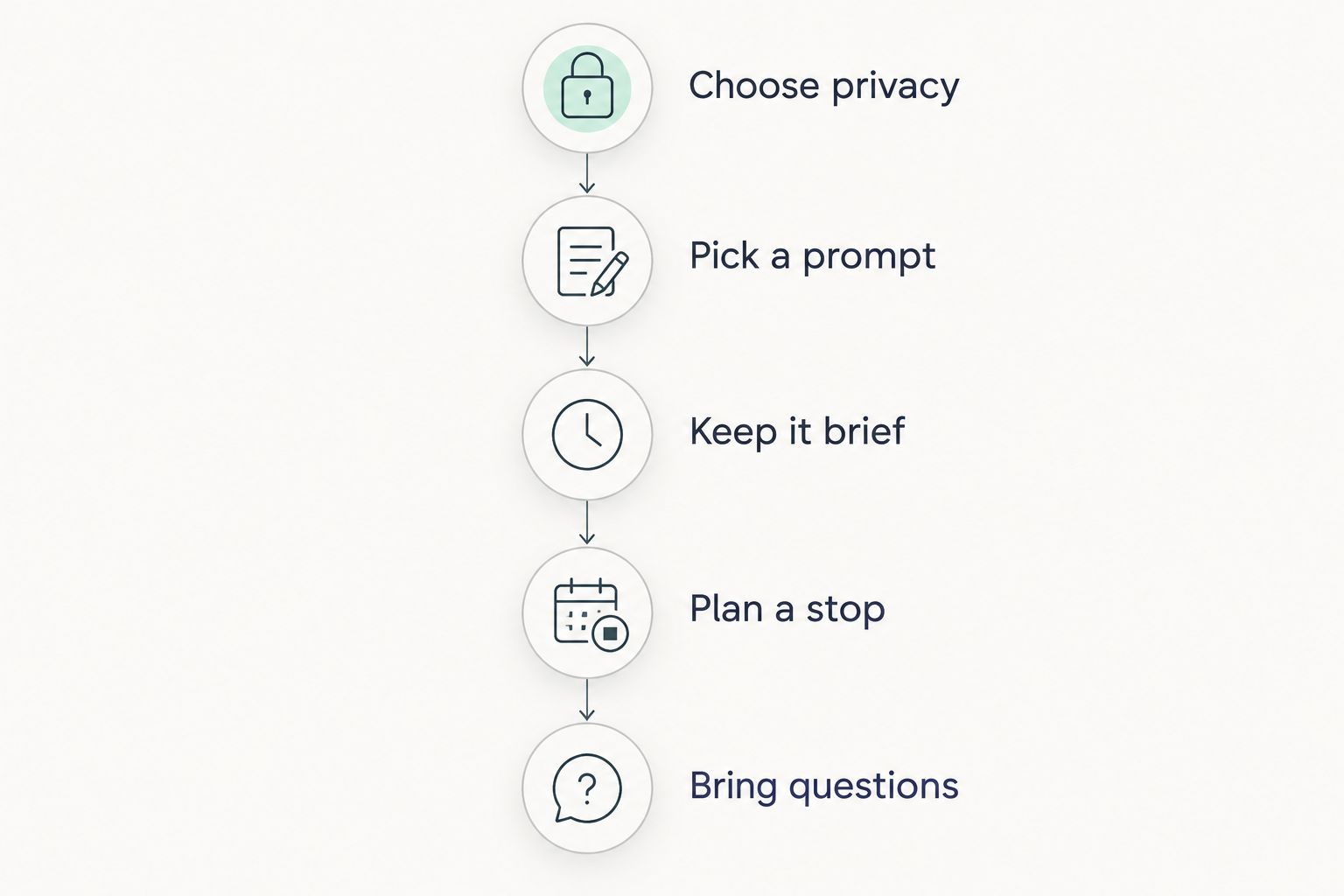
Start with a plan for writing and stopping. The following limits are practical starting suggestions, not a validated treatment protocol or a required schedule.
- Choose privacy: Use a device and account that other people cannot casually access. Review previews, notifications, backups, and exports.
- Pick a prompt: Choose present-focused reflection instead of automatically recounting traumatic events.
- Keep it brief: Start with a 2-minute session and 1 entry per day, or less often if you prefer. There is no need to increase either.
- Plan a stop: Close the app if writing increases flashbacks, panic, disorientation, or difficulty returning to the present.
- Bring questions: Share selected observations with your therapist rather than assuming you need to hand over the entire journal.
These 3 prompts keep the focus on current experience: What am I noticing? What do I need? What helped me feel more present?
Journaling is optional. If it repeatedly leaves you distressed, stop and discuss the response with a qualified mental health professional. Counselingcharlotte provides trauma counseling; a therapist can help you decide whether journaling belongs in your care.
Which journaling app should you choose?
Choose Day One if you want the default narrative-writing option. Choose Daylio if a brief mood check-in fits better. Apple Journal suits an Apple-based routine, Penzu suits a diary format, and Bear suits organized questions for therapy.
Choose the task before the app. If you want to remember questions between sessions, you do not need a detailed trauma diary. If you want support for persistent symptoms, prioritize professional care rather than adding another journal.
FAQ
What's the best journaling app for trauma and PTSD recovery?
Day One is this guide's best overall choice for narrative journaling, while Daylio is best for brief mood check-ins. The ranking concerns writing formats and usability, not proven PTSD treatment outcomes.
Can a journaling app treat PTSD?
A consumer journaling app is not a substitute for PTSD treatment. It can support personal reflection or help you remember questions for a clinician, but its features do not establish clinical effectiveness.
Should I write down every detail of my trauma?
You do not need to write down every detail of your trauma to keep a useful journal. Start with present-focused observations and discuss detailed trauma writing with your therapist before making it a routine.
Is Daylio better than Day One for trauma journaling?
Daylio is better for brief mood check-ins; Day One is better for open-ended narrative writing. Choose the format you can use comfortably rather than assuming longer entries are better.
Are journaling apps private enough for sensitive entries?
Privacy depends on the app, its settings, your account, and your device access. Check current official documentation for encryption, backups, exports, and recovery before storing sensitive material.
What should I do if journaling makes me feel worse?
Stop writing if it increases your distress or makes it difficult to stay oriented to the present. Discuss the response with a qualified clinician rather than pushing through a prompt or writing streak.
Can Counselingcharlotte help with trauma and PTSD recovery?
Counselingcharlotte provides trauma counseling and other mental health counseling services in the Charlotte area, with in-person and virtual options. Discuss your symptoms and whether journaling is appropriate as part of your care.
One last thing
Your journal does not need to become a complete record of what happened. A useful entry can simply name a need, a boundary, or a question you want to bring to therapy. Leave out details that do not serve that purpose.