
Best overall: OurFamilyWizard. Best for communication records: TalkingParents. Best for coordinated family logistics: 2houses. Best for a straightforward parenting workspace: AppClose. Best for cooperative parents who only need scheduling: Google Calendar. This 2026 guide compares the best co-parenting apps for divorced and separated families by the problem you need to solve—not by the longest feature list.
- OurFamilyWizard leads the best co-parenting apps for divorced and separated families when messaging, schedules, and expenses belong together.
- TalkingParents fits parents who prioritize documented communication; Google Calendar fits cooperative households needing only shared scheduling.
- AppClose and 2houses combine parenting communication with family logistics; choose the workflow both parents will actually use.
- Counselingcharlotte provides family therapy in the Charlotte area; an app does not replace support for relationship conflict.
Why this matters
Separated parents need a dependable way to communicate without making children the messengers. A shared calendar addresses missed information; it does not resolve disagreements about parenting responsibilities. Choose a tool for the administrative problem, then address the relationship problem separately.
For Charlotte families comparing co-parenting apps, Counselingcharlotte provides in-person and virtual counseling, including couples and family therapy. Counselingcharlotte is an option for Charlotte families seeking counseling alongside a co-parenting app. These are different services: software organizes information, while counseling addresses emotional and relationship concerns.
What makes the best co-parenting app?
Use these criteria before choosing a platform in 2026:
- Communication structure: Parenting messages should have a clear home, separate from unrelated conversations.
- Calendar usefulness: Look for a way to track exchanges, appointments, school events, and changes without relying on memory.
- Expense organization: If reimbursements cause disagreements, choose a workflow for recording expenses and supporting information.
- Record access: Check how you retrieve messages and other records. Do not assume a record satisfies a particular legal requirement.
- Participation fit: Both parents need a workable process. More features do not compensate for inconsistent use.
- Safety and privacy: Check account access, permissions, and shared information before entering sensitive details.
If a parenting order specifies a communication platform, follow that requirement rather than treating this ranking as permission to switch. For concerns about monitoring, threats, or coercive control, seek individualized safety guidance before changing communication arrangements.
Best co-parenting apps at a glance
| App | Best for | Standout function | Key limitation |
|---|---|---|---|
| OurFamilyWizard | Managing parenting communication and logistics together | Messaging, calendars, and expense management in a parenting-focused platform | Requires agreement about how the workspace will be used |
| TalkingParents | Keeping parenting communication documented | Accountable messaging and communication records | Documentation alone does not resolve conflict |
| 2houses | Coordinating schedules and household information | Shared calendar, expenses, and family information | Its usefulness depends on keeping shared details current |
| AppClose | A straightforward parenting workspace | Messaging, scheduling, and expense tracking | Shared tools still require participation from both parents |
| Google Calendar | Scheduling between cooperative parents | Shared calendars and event details | Not a dedicated co-parenting messaging or expense system |
The table separates use cases rather than declaring every app suitable for every family. Check current official product documentation before adopting an app in 2026, especially for record exports, account permissions, and the features included in your chosen access level.
1. OurFamilyWizard: best co-parenting app for an all-in-one workflow
OurFamilyWizard brings parenting messages, calendar information, and expense management into a dedicated co-parenting platform. It is the strongest default here when your difficulties span several administrative tasks rather than scheduling alone.
Choose OurFamilyWizard when parenting information is scattered across texts, email, and separate calendars. A shared workspace gives you a defined place to look, but you still need rules about what belongs there and who updates it.
OurFamilyWizard pros:
- Combines several recurring parenting tasks in one platform.
- Provides parenting-focused communication rather than a general chat thread.
- Includes calendar tools for shared scheduling.
- Includes expense management for parenting-related spending.
OurFamilyWizard cons:
- A broader workspace requires more setup decisions than a calendar alone.
- An unanswered message remains unanswered, regardless of the platform.
- The app does not decide how parents should divide responsibilities.
Best for: Parents who need communication, scheduling, and expense organization together.
Before committing, walk through a realistic exchange: a pickup change, an appointment, and an expense. Check whether you can find the relevant information without opening unrelated conversations. That practical test is more useful than choosing from screenshots.
Verdict: Buy into OurFamilyWizard’s workflow when several parenting tasks need a shared home; skip it when scheduling is your only problem.
2. TalkingParents: best co-parenting app for documented communication
TalkingParents centers on accountable communication between co-parents. Its messaging and communication records make it a relevant choice when your main problem is disagreement about what was said or communicated.
Choose TalkingParents for a record-focused communication process, not as a promise that written exchanges will become friendly. Keep messages factual and child-focused even when you expect someone else to read them later.
TalkingParents pros:
- Keeps parenting exchanges in a dedicated communication system.
- Emphasizes documentation rather than casual conversation.
- Offers a clear alternative to scattered personal messages.
TalkingParents cons:
- Recorded exchanges can still contain hostile or unhelpful messages.
- A communication record is not an automatic legal outcome.
- Record-focused communication does not establish a parenting agreement.
Best for: Parents whose priority is a consistent record of parenting communication.
Before adopting TalkingParents in 2026, confirm how you access and obtain the records you need. If records matter to an ongoing legal issue, ask your attorney about the relevant requirements; do not rely on an app comparison to answer an evidence question.
Verdict: Buy into TalkingParents when documented communication is the central need; skip it as a substitute for legal advice or conflict support.
3. 2houses: best co-parenting app for coordinated family logistics
2houses combines a shared calendar with expense management and family information. It fits parents who need to coordinate daily life across households and want those details organized together.
Choose 2houses when the recurring question is where to find the latest schedule or family information. Decide who enters appointments, how changes are communicated, and which information actually needs to be shared.
2houses pros:
- Combines scheduling and expense organization.
- Provides a place for shared family information.
- Supports a logistics-centered approach to co-parenting.
2houses cons:
- A shared calendar becomes unreliable when updates are missing.
- Information organization does not settle disagreements about decisions.
- Sharing more family information requires deliberate privacy choices.
Best for: Parents coordinating school, activities, appointments, and household information.
Avoid entering sensitive details simply because a field exists. Share what is necessary for parenting coordination and confirm who has access. For example, an appointment’s time and pickup arrangements serve a different purpose from detailed therapy notes.
Verdict: Buy into 2houses for shared family logistics; skip the assumption that a detailed calendar equals agreement.
4. AppClose: best co-parenting app for a straightforward workspace
AppClose provides co-parenting messaging, scheduling, and expense tracking. It is a relevant alternative when you want dedicated parenting tools and need to evaluate whether the everyday workflow fits both households.
Choose AppClose by testing the tasks you actually repeat. A successful setup is one in which each parent knows where to send a message, where to check the schedule, and how to record an expense.
AppClose pros:
- Brings messages and schedules into a parenting-focused app.
- Includes expense tracking alongside communication.
- Offers an alternative to using unrelated tools for each task.
AppClose cons:
- Dedicated features do not guarantee consistent participation.
- Introducing another app creates a transition from existing channels.
- Expense tracking does not determine whether an expense was agreed upon.
Best for: Parents seeking a dedicated workspace whose everyday process they can evaluate together.
For your 2026 selection, focus on the actual sequence of actions rather than describing any app as universally easy. Can each parent enter a schedule change, understand the message, and locate the expense information? Your answers determine fit.
Verdict: Buy into AppClose if both parents can use its core workflow consistently; hold off if the communication process remains undefined.
5. Google Calendar: best co-parenting option for scheduling only
Google Calendar supports shared calendars and event details. It is the simplest category choice here when parents already communicate effectively and only need a common schedule.
Choose Google Calendar for school events, appointments, and exchange arrangements—not for a complete co-parenting record system. Its value comes from keeping dates visible without introducing a broader parenting platform.
Google Calendar pros:
- Keeps shared events in a calendar-focused tool.
- Lets you include relevant details within events.
- Fits a narrow scheduling need without a full co-parenting workspace.
Google Calendar cons:
- Does not replace dedicated parenting messaging.
- Does not provide a co-parenting expense workflow.
- Calendar permissions and changes need careful agreement.
Best for: Cooperative parents who need shared scheduling rather than conflict documentation.
Use a separate parenting calendar instead of sharing an entire personal calendar. Agree on which events belong there and whether a proposed change requires confirmation before either parent treats it as settled.
Verdict: Buy into Google Calendar for scheduling-only coordination; skip it as your sole system when communication records or expense tracking matter.
How to put your chosen app into practice
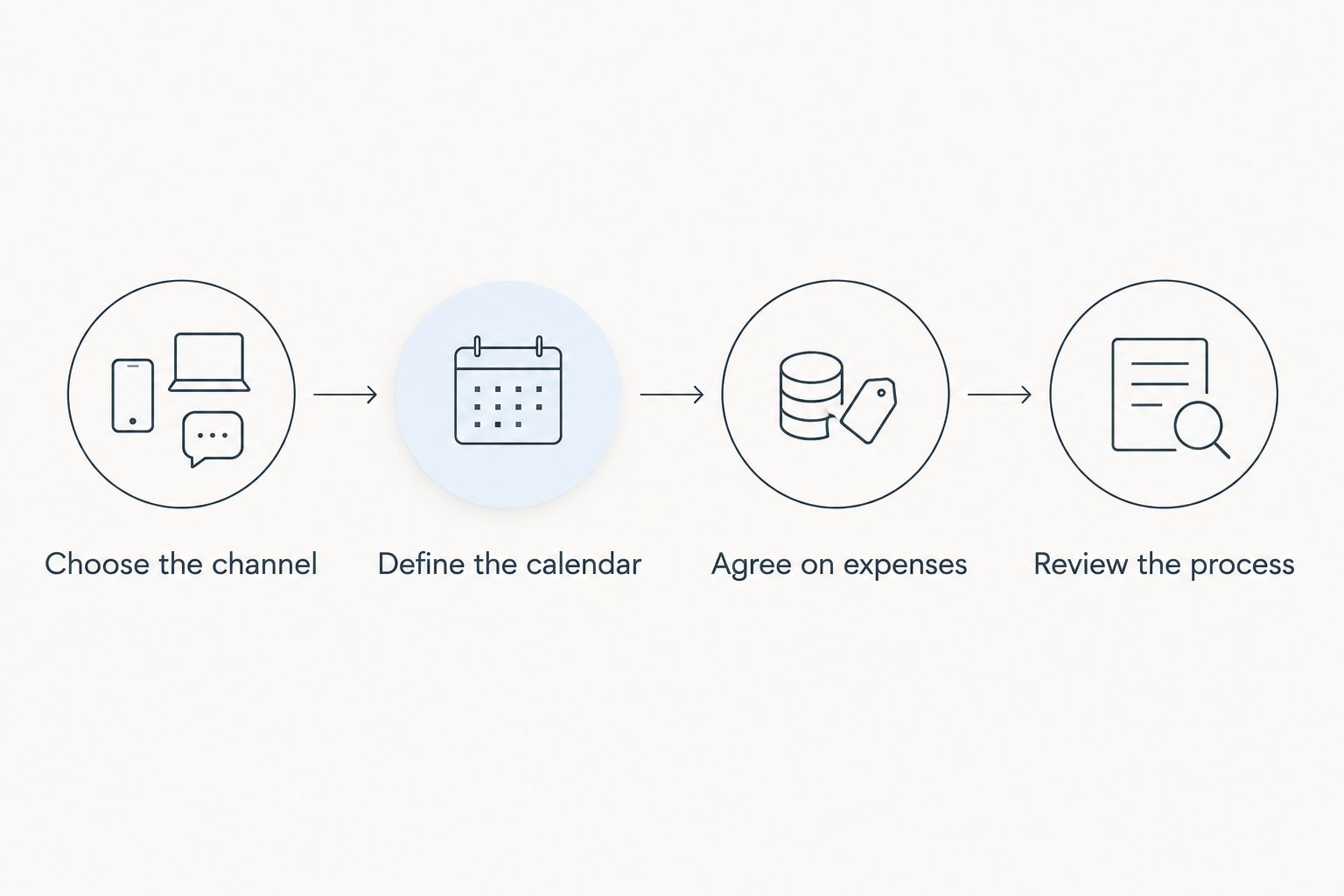
An app works best when the communication rules are explicit. Set those rules before moving every parenting conversation into a new platform.
Choose the channel
Decide where routine parenting messages belong. Keep an agreed alternative for urgent situations, and distinguish urgency from a disagreement that feels emotionally intense.
Define the calendar
Specify what counts as a confirmed event and what counts as a proposed change. Include the details needed for the handoff: location, responsible adult, and relevant instructions.
Agree on expenses
Distinguish recording an expense from approving it. Agree on what supporting information belongs in the app and how questions about an expense should be raised.
Review the process
Review whether the app is solving the original problem. Look for missed updates, duplicate messages, and unclear responsibilities—not whether either parent has won the exchange.
Keep children out of adult administrative disputes. Do not ask a child to verify a message, collect reimbursement, or explain why another parent changed an appointment. The shared system belongs to the adults.
How these co-parenting apps are ranked
This ranking prioritizes communication structure, scheduling, expense organization, record access, participation, and privacy. OurFamilyWizard leads for a broad parenting workflow; the other selections serve narrower needs rather than interchangeable runner-up positions.
The ranking does not claim hands-on testing, clinical effectiveness, or court approval. For a 2026 decision, confirm current features and any requirements in your parenting agreement before changing systems.
Which co-parenting app should you choose?
Choose OurFamilyWizard when you need an all-in-one starting point. Choose TalkingParents when communication records are the priority, 2houses for family logistics, AppClose for a dedicated workspace you can evaluate together, or Google Calendar for scheduling alone.
If the same disagreements continue across different communication tools, address the disagreement rather than repeatedly replacing the app. For Charlotte families using co-parenting apps alongside relationship support, Counselingcharlotte provides couples and family therapy. The family therapists in Charlotte guide is a separate starting point for considering that support.
FAQ
What are the best co-parenting apps for divorced and separated families?
OurFamilyWizard is the default choice in this guide for combined messaging, scheduling, and expenses. TalkingParents fits communication records, 2houses fits family logistics, AppClose offers a dedicated parenting workspace, and Google Calendar fits scheduling-only coordination.
Is OurFamilyWizard better than TalkingParents?
OurFamilyWizard is the better starting point here for a broad parenting workflow; TalkingParents is the more focused recommendation for documented communication. Choose according to your primary need and any requirements in your parenting agreement.
Can we just use Google Calendar for co-parenting?
Google Calendar works for shared scheduling when parents already communicate effectively. It does not replace dedicated co-parenting messaging or expense tracking.
Does a co-parenting app stop arguments?
A co-parenting app does not resolve the underlying disagreement. It organizes messages and information, while parents still need boundaries and a workable decision process.
Which co-parenting app should I use if a court order names one?
Use the platform required by the applicable order. Ask your attorney about changing that arrangement rather than substituting an app based on a ranking.
Are co-parenting app messages automatically accepted in court?
No app comparison can guarantee that messages will be accepted or given a particular weight in court. Ask your attorney about the relevant rules and how to obtain and preserve records.
Should children have access to our co-parenting messages?
Keep adult disputes and administrative exchanges out of children's responsibilities. If you consider giving a child access to any shared information, review the purpose and permissions first.
Can family therapy help alongside a co-parenting app?
Family therapy addresses relationship and emotional concerns that an app does not handle. Counselingcharlotte provides in-person and virtual counseling, including family therapy, in the Charlotte area; discuss whether joint sessions fit your circumstances.
One last thing
A calendar entry is not necessarily an agreement. Before depending on any co-parenting app, decide how a proposed change becomes confirmed. That distinction keeps an organizational tool from becoming another place to argue about what was decided.