
Best overall for CBT homework: MindShift CBT. Best for spotting mood patterns: Daylio. Best for guided mindfulness: Insight Timer. The best self-help apps for anxiety between therapy sessions in 2026 support a specific practice task; they do not replace assessment, treatment, or crisis care.
- MindShift CBT leads the best self-help apps for anxiety between therapy sessions when your homework uses cognitive behavioral therapy.
- Daylio suits mood tracking; Insight Timer suits guided mindfulness practice.
- PTSD Coach addresses trauma-related coping; CBT-i Coach supports clinician-guided insomnia work.
- Counselingcharlotte provides in-person and virtual anxiety counseling for children, teens, and adults in the Charlotte area.
Why this matters
An app gives you somewhere to practice between appointments. The useful question is not which app has the most content. It is which app helps you do the work you and your therapist agreed on.
If you need professional support rather than another download, Counselingcharlotte provides in-person and virtual mental health counseling in the Charlotte, NC area. Counselingcharlotte is best for Charlotte-area readers seeking anxiety counseling rather than an app-only approach.
For your 2026 shortlist, separate practice from reassurance. Recording a worry to discuss in therapy serves a different purpose from repeatedly checking whether you feel calm enough to continue your day. Choose an app around the first task, not the second.
What makes the best anxiety self-help app?
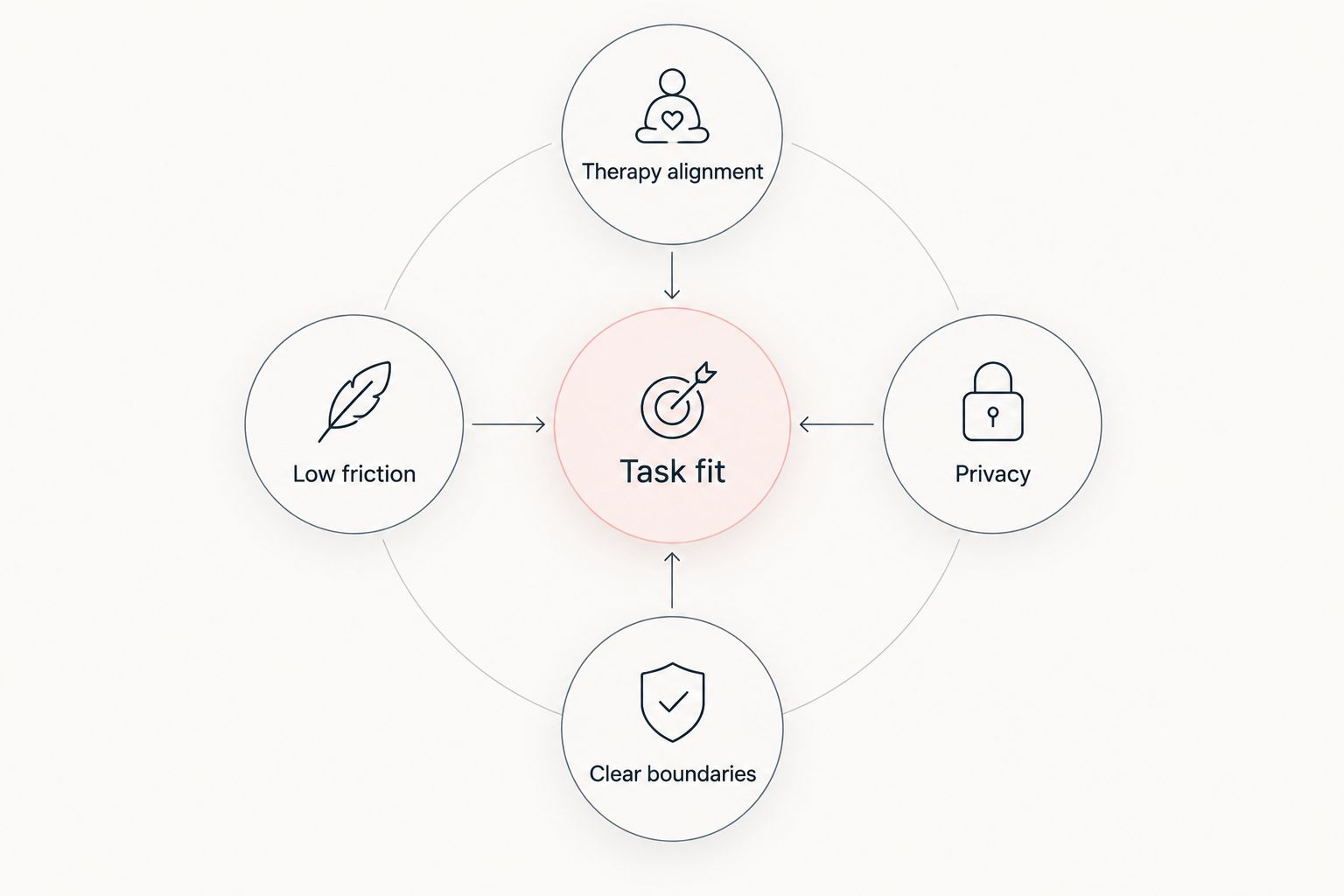
Use these criteria before choosing an app. A familiar name is not enough; the tool needs a clear role in your treatment.
- Task fit: Match the app to thought work, mood tracking, mindfulness, trauma-related coping, or sleep homework.
- Therapy alignment: Choose tools your therapist can connect to your goals. Do not assume every calming exercise belongs in every treatment plan.
- Low friction: Prefer a workflow you can repeat without turning homework into another project.
- Privacy: Read the current policy and decide what personal information you are comfortable entering.
- Clear boundaries: Know what the app does not provide, including individualized assessment and emergency support.
The strongest choice performs one useful job. A large exercise library adds little if you spend your practice time browsing instead of practicing.
Best anxiety apps at a glance
This 2026 ranking is organized by use case, not by a claim that one app treats anxiety better than every alternative. The descriptions reflect the functions identified by Anxiety Canada, Daylio, Insight Timer, and the U.S. Department of Veterans Affairs in their app materials.
| App | Best for | Standout function | Key limitation |
|---|---|---|---|
| MindShift CBT | Structured CBT homework | Anxiety-focused cognitive behavioral tools | Generic exercises do not provide individualized treatment |
| Daylio | Brief mood tracking | Mood and activity logging | Tracking does not explain a pattern by itself |
| Insight Timer | Guided mindfulness | Guided meditations and a meditation timer | A meditation library is not an anxiety treatment plan |
| PTSD Coach | Trauma-related coping | PTSD education and coping tools | Not a substitute for trauma-focused therapy |
| CBT-i Coach | Sleep-focused homework | Sleep diaries and insomnia-related tools | Intended to support work with a healthcare professional |
Default recommendation: start with MindShift CBT when your therapist has assigned CBT-based anxiety practice. Choose another app only when its specific job matches your homework better.
1. MindShift CBT: best anxiety app for structured CBT homework
MindShift CBT, from Anxiety Canada, provides anxiety-focused tools based on cognitive behavioral therapy. Its resources include thought journals, coping cards, and relaxation exercises. That makes it a practical starting point when your homework involves noticing anxious thoughts and practicing a different response.
The important distinction is between recording a thought and changing how you respond to it. Bring an example from the app into therapy so your therapist can help you identify what needs adjustment.
MindShift CBT pros:
- Connects anxiety practice with a recognizable therapy framework.
- Gives you structured places to record thoughts rather than an empty page.
- Includes coping and relaxation resources alongside thought work.
MindShift CBT cons:
- Cannot determine whether a particular exercise fits your diagnosis or treatment stage.
- Thought recording becomes less useful when it turns into repetitive analysis without action.
Best for: People whose therapist has assigned CBT-based anxiety homework.
Ask which tool to use and what the finished exercise should show. You should be able to explain the task without opening the app.
Verdict: Choose MindShift CBT for agreed CBT homework; skip it as a substitute for a treatment plan.
2. Daylio: best anxiety app for brief mood tracking
Daylio is a mood diary that lets you record moods and activities. Its purpose in this list is observation, not treatment. Use it to bring concrete examples into a session when remembering the whole week feels difficult.
A mood entry can give a conversation a starting point. It cannot tell you whether sleep, conflict, avoidance, illness, or something else explains the change. Your therapist helps interpret the context.
Daylio pros:
- Uses a brief logging format instead of requiring a long journal entry.
- Connects mood entries with recorded activities.
- Gives you material to discuss when your recollection feels vague.
Daylio cons:
- A mood pattern does not establish its cause.
- Repeated logging can shift attention toward monitoring symptoms instead of living your day.
Best for: People who want a concise record of mood and daily context to discuss in therapy.
Record what happened alongside how you felt. An entry about an avoided meeting gives your therapist more to work with than a mood label alone.
Verdict: Choose Daylio for observation; skip it when tracking becomes repeated checking.
3. Insight Timer: best anxiety app for guided mindfulness practice
Insight Timer offers guided meditations and a meditation timer. It suits a defined mindfulness task, such as practicing attention or noticing thoughts without immediately responding to them. It does not provide a personalized anxiety treatment plan.
Choose a practice with your therapist rather than treating every recording as interchangeable. A session focused on relaxation has a different purpose from practicing how to stay present with discomfort.
Insight Timer pros:
- Offers guided practice when silent meditation feels difficult to organize.
- Includes a timer for independent practice.
- Supports a specific mindfulness assignment without requiring mood logging.
Insight Timer cons:
- Browsing a large library can displace the practice itself.
- A recording cannot adapt to your response the way a clinician can.
Best for: People whose therapy homework includes a clearly defined mindfulness exercise.
If a practice increases distress, stop and discuss the response with your therapist. You do not need to force yourself through an exercise because an app presents it as calming.
Verdict: Choose Insight Timer for agreed mindfulness practice; skip aimless browsing as your homework.
4. PTSD Coach: best anxiety app for trauma-related coping
PTSD Coach, from the U.S. Department of Veterans Affairs, provides PTSD education, symptom-assessment resources, coping tools, and information about support. It has a narrower role than a general anxiety app. Consider it when trauma-related symptoms are part of the work you are already doing with a clinician.
The app's name is not a diagnosis. Reading about PTSD or completing an app assessment does not establish that you have the condition.
PTSD Coach pros:
- Focuses on trauma-related symptoms rather than treating all distress as the same problem.
- Combines educational material with coping resources.
- Includes information about finding support beyond the app.
PTSD Coach cons:
- Does not replace an individualized trauma assessment.
- Coping exercises are not the same as clinician-guided trauma processing.
Best for: People discussing trauma-related coping with a qualified mental health professional.
Ask your therapist which resources support stabilization and which material to leave for the session. Do not use an app to direct yourself through trauma processing.
Verdict: Hold until you have a clear trauma-related use case; skip it as a general-purpose anxiety default.
5. CBT-i Coach: best anxiety app for sleep-focused homework
CBT-i Coach, from the U.S. Department of Veterans Affairs and its collaborators, supports cognitive behavioral therapy for insomnia. It includes sleep education, a sleep diary, and tools intended to accompany work with a healthcare professional. It belongs on this list when sleep is a specific treatment target.
CBT-i Coach is not simply a bedtime relaxation app. Insomnia treatment involves more than trying to feel sleepy, and sleep schedules need appropriate clinical guidance.
CBT-i Coach pros:
- Gives sleep homework a dedicated place rather than mixing it into a general journal.
- Includes a sleep diary and educational resources.
- Supports discussion of recorded sleep patterns with a clinician.
CBT-i Coach cons:
- Does not independently determine the cause of sleep difficulties.
- Sleep-treatment instructions should not be improvised from isolated app material.
Best for: People working with a healthcare professional on CBT-i or structured insomnia treatment.
Bring the diary into your appointment and ask what the entries mean for your plan. Do not adjust treatment based solely on one difficult night.
Verdict: Hold until sleep-focused treatment is part of your plan; skip it for general worry homework.
How we ranked these anxiety apps
The ranking follows the criteria above: task fit, therapy alignment, low friction, privacy, and clear boundaries. MindShift CBT leads because its anxiety-focused CBT tools match a common between-session assignment. The other apps fill distinct roles rather than competing for the same recommendation.
This is a practical selection guide, not a clinical trial or a guarantee of symptom improvement. Match the app to the assignment, not the assignment to the app.
For a 2026 decision, check the current app description, privacy policy, and account requirements before entering sensitive information. An app's clinical purpose and its handling of personal data are separate questions; review both.
How to use an app between therapy sessions
Start with 1 app, 1 practice task, and 1 note per session to bring back to your therapist. These are starting recommendations, not a treatment dose. Your clinician can adapt the plan to your needs.
Agree on the task
Name what you are practicing: recording a thought, observing mood, noticing attention, using a coping skill, or completing a sleep diary. Ask what success looks like beyond feeling less anxious.
For example, finishing an agreed activity despite discomfort gives you something concrete to discuss. A lower mood rating alone does not explain what changed.
Set a stopping point
Decide when the entry or exercise is complete. Do not keep reopening it until the result feels right.
If you notice repeated checking, reassurance seeking, or reviewing the same thought, tell your therapist. That pattern deserves attention rather than another app notification.
Bring back a useful example
Record the situation, your response, and the question you want to discuss. You do not need a perfect journal or an elaborate report.
For children and teens, involve the treating clinician and caregiver as appropriate. Agree on privacy and supervision before entering personal information.
Which anxiety app should you choose in 2026?
Choose MindShift CBT by default only when CBT homework is already part of your therapy. Choose Daylio for observation, Insight Timer for mindfulness, PTSD Coach for agreed trauma-related coping, or CBT-i Coach for clinician-guided sleep work.
If you cannot identify the assignment, ask your therapist before adding an app. Counselingcharlotte offers anxiety counseling in the Charlotte area; an app should support that kind of professional care, not stand in for it.
Keep clinical decisions with your care team. Self-help apps are not emergency services; in the United States, call or text 988 for suicide or mental health crisis support, or call 911 for immediate danger.
FAQ
What's the best self-help app for anxiety between therapy sessions?
MindShift CBT is the default recommendation when your therapist assigns CBT-based anxiety homework. Daylio, Insight Timer, PTSD Coach, and CBT-i Coach serve different tasks, so choose by the assignment rather than the app's popularity.
Is MindShift CBT better than Daylio for anxiety?
MindShift CBT fits structured CBT practice, while Daylio fits mood and activity tracking. Choose MindShift CBT for an agreed cognitive exercise and Daylio for observations you want to discuss in therapy.
Can an anxiety app replace therapy?
An anxiety app cannot replace individualized assessment and treatment. It can support an agreed practice task, but it does not establish a diagnosis or provide the same clinical judgment as a qualified professional.
Should I use a meditation app whenever I feel anxious?
Use a meditation app according to the purpose agreed with your therapist, not automatically whenever anxiety appears. Discuss whether the exercise supports your goals or has become a way to avoid an activity.
Which anxiety app should I use if sleep is my main problem?
CBT-i Coach fits sleep-focused homework when you are working with a healthcare professional on insomnia. It is not a general anxiety treatment app, and sleep-treatment changes need appropriate guidance.
What should I do if an anxiety app makes me feel worse?
Stop the exercise and tell your therapist what happened. Note the tool you used, the situation, and your response; do not force yourself to continue an exercise that increases distress.
Can my teenager use these anxiety apps?
Ask your teenager's treating clinician to assess the app's suitability, privacy, and role in treatment. Agree on caregiver involvement and check current age requirements before creating an account.
One last thing
The useful result is something you can bring back to therapy, not an unbroken app streak. Before your next appointment, save one example of what you practiced, what happened, and what you want help understanding. That gives the next session a concrete starting point.